Project objective
Davis Core and Pad was a small manufacturing company of about 60 employees. I was hired to build an
embedded control system to run the production machines on the manufacturing floor. Twenty-five years ago, we were
using a custom built z80 processor and serial rs485 networking with a custom coded real time kernel
and token ring type networking protocol that I personally coded in assembly and dynamic C. Technology
has come a long way since then, and the latest iteration is built using an x86 industrial PC running
Windows Embedded Standard 7 and using a standard Ethernet network coded in c++ feeding into PostgreSQL
database for reporting. Reporting software is written in c# and provides among other things, the live $/hr,
employee efficiency monitoring, inventory control, along with yearly, monthly and daily customizable reports.
The company was sold in January 2020. With a fully functioning system and new management moving in a
different direction, I moved on in February 2020. I gained full ownership of the software as part of the
sale other than a perpetual license for the purchasing company, Drew Foam.
Current Project Status
Through a negotiated agreement, Brian Davis acquired full ownership of all controller related software when
Davis Core and Pad was sold to Drew Foam. Drew Foam acquired a perpetual license to the existing version of the
software but not any future updates. The software is no longer in active development at this time.
Current Project Overview
This system allows control and monitoring of the shape molding machines throughout the plant at Davis Core and Pad.
It is broken into three components:
- Controller Hardware Physically controls each shape molding machine turning on and off relays to
produce the parts. Runs on each individual shape molding machine in the plant.
- Controller Software Runs on the Controller hardware. This is the fundamental software that
provides the user interface and control functions for the machine. Coded in C++.
- DBconnector Software Runs on the Controller hardware. This application facilitates synchronization
with the database. It handles all network communication. Coded in C#.
- Database Standard PostgreSQL database. Coded in SQL and PL/pgSQL using stored procedures.
- Controller Reports Desktop application that provides reporting and monitoring of the machines and
employees. Coded in C#.
This document is only intended to be a summary of these applications. A complete list of all of the functionality is
beyond the scope of this document.
Controller Hardware
The hardware for the controller includes:
- an industrial touchscreen ~$900
- an x86 based industrial PC ~$800
- a USB controller for the relays ~$150
- a bank of relays ~$15 each (25 total)
- Case, Cables, Misc. ~$200
- Current OS is Windows Embedded Standard 7 (comes preinstalled with the industrial PC),
but it will run under any version of windows after XP
The only hardware that is not straight off the shelf is the industrial PC. A hard drive image
can be ghosted directly to the PC to create spare controllers, so no complicated configuration
is needed. However, the controller software and DBconnector will run on any basic windows
installation from Windows XP all the way up to Windows 10.
Controller Software
Controller is the software and hardware running on each shape molding machines in the plant.
It uses a touch screen to interact with the user and a relay bank to interact with the machine.
The controller software is written in the C++ language and is composed of 17583 lines of custom code.
The following screenshot is the home screen of the controller application. It shows a live
Controller program running.
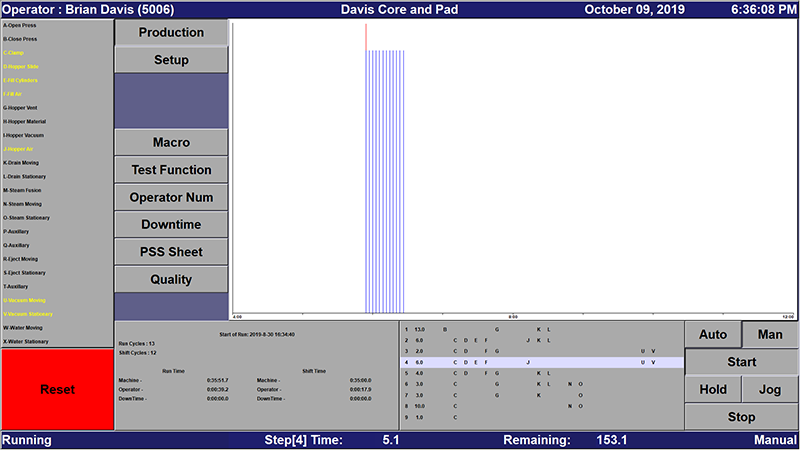
The above image provides a summary of the Controller software Home Page.
- Left Side - the list of functions available to activate on the machine and their associated
alphabet letter. For example, A - Open Machine, B - Close Machine,…etc.
- The bottom left - the statistics about the part, machine, shift, and the overall
production run.
- The bottom middle - is the current Controller Program that is running and the current
step that the program is executing.
- The very bottom footer – Time left in the current step, Time left in the current cycle.
- Top Header – Operator Name, Time, and Date
- Top Middle – Graph of the current shift. X Axis is the time of the shift eg. 8am-4pm. Y Axis
is the length in time of a cycle. Blue lines are the machine running, red lines are the machine
paused or time between cycles.
Core controller functionality:
- Executes Controller programs on the machine.
- Allows easy programming of the programs on the machine by foremen in a live environment.
- Programs are composed of 30 steps executed consecutively. Each step includes a set of
relays or functions to activate and how long to the 10th of a second to stay in the step.
- Tracks information about the Cycle, Shift, and Run of a part.
- Displays PSS sheets for the quality system
- Reports quality checks for the quality system
- Displays employee statistics and a graph of the shift’s production at a glance for any
foreman passing by.
- Tracks the current part code and employee running on the machine at any give time.
- Upload and Download controller programs and part information to and from the Postgres database.
- Configuration and testing functions to troubleshoot problems.
- Standardized easily swappable hardware:
- If screen fails, swap the screen.
- If the relays fail, swap the relays
- If PC fails, swap the PC (ideally with a pre-built spare that has the system
pre-installed).
- If the network fails, use the tools in the program to troubleshoot where
the problem is.
DBconnector
DBconnector provides the networking component of the controller. Separating it out allows
better isolation between the network and Controller. This increases the stability of
Controller since its task is only to run the machine. Controller can run standalone safely
with no network or with the network connection down. The design of the system is to be as
robust as possible so that the production line never goes down.
DBconnector is written in the c# language targeting the .net 4.0 platform and contains 2792
lines of custom code.
Database
The database is written in standard SQL and PL/pgSQL using stored procedures. It is constructed
as a 37 table relational database with around 20 stored procedures that provide the API.
It can be hosted on any standard PostgresSQL server either from an on-site server
or from a server hosted somewhere on the intranet or internet. The database uses standard
SQL technology in a Postgres database. It is possible to run Controller Reports
from anywhere in the world and see live streaming data from the Controllers.
Core Database Functionality:
- View Live reports from anywhere in the world.
- Standard SQL relational database design can extend functionality beyond Controller View.
- Custom SQL queries can be written directly to the database using psql or PGAdmin
which are direct access Postgres programs or read into a standard application such
as a Microsoft Excel spreadsheet. Excel supports SQL directly through a datasource.
- Direct integration with other ERP or accounting software is possible.
Controller Reports
Controller View is the application that runs on the office desktop computers to monitor the data
generated by the controllers. Foremen will use this program to enter their final numbers for the
day. Quality PSS sheet data is entered into the system using this program. This program is
essentially the front end or client for the database.
The intent here is to give an overview of how it can be used. The code is 5,572 lines of custom code
written in the c# language targeting the .net 4.0 platform.
Existing functionality includes:
- Daily Active Monitoring
- Is the machine is running currently
- How long the machine has run today
- How many parts have been produced today.
- How efficient has each employee running the machine been.
- How efficient was 3rd shift last night? What parts were produced?
- Yearly, Weekly, or Monthly reporting
- How long did the machine/part run?
- What gross sales did the machine/part produce?
- How efficient were the employees over the year organized by each employee?
Some Screen shots may help with understanding Controller Reports:
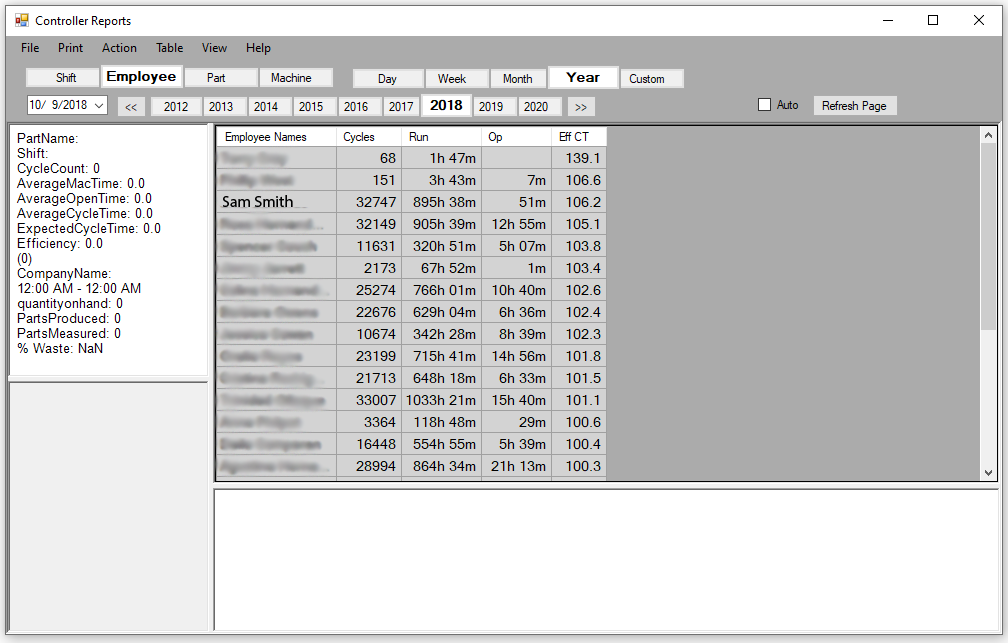
This chart shows the employees in the year 2018 ranked by efficiency. The top two are foreman and
their cycles are test cycles as you can see by the very low cycle count. In 2018, Sam Smith (name changed)
was our most efficient employee with a stunningly small quantity of wasted time of 51 minutes total over
the course of the year.
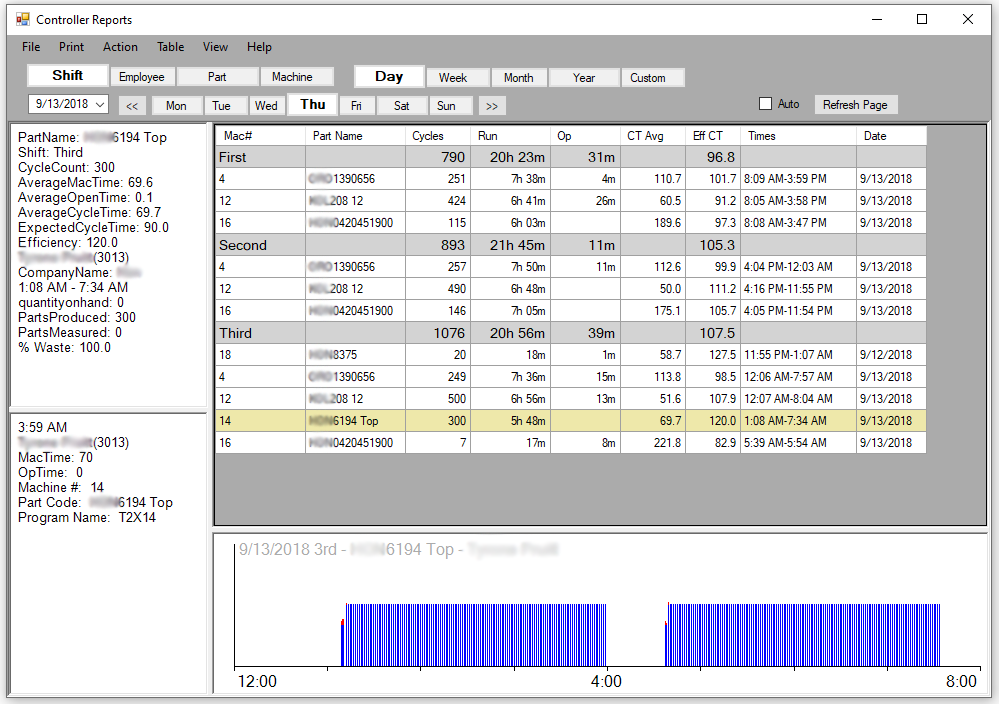
The above chart shows the 3 machines that were running on 1st and 2nd shifts and 5 machines
running 3rd. You can see that 3rd shift was the most efficient this day at 107.5% efficiency.
It also shows that the 3rd shift employee, #3013, started his shift an hour late at 1:08AM,
took a long 38 minute lunch, and ended his shift 26 minutes early. The machine was running on
automatic since there is almost no red in the chart, and the cycle time is perfectly flat at
70 seconds.
Core Controller View Functionality:
- Can be run on almost any Microsoft Windows based PC or can be emulated on most hardware that supports .NET.
- Can view data collated by: Shift, Employee, Machine, or Part Number
- Can view data over any date range with both summaries or specific details in the report, e.g. Yearly, Monthly, Daily, Custom.
- Modular design for columns to create targeted reports and easy future development. Adding new column calculations is trivial.
Currently there are 26 sortable selectable columns that include the following functionality:
- Employee Number/Employee Name
- Part Number/Part Name
- Machine Number
- Dollars/hr
- Time/Date/Shift
- 4 types of Employee Efficiency
- Pounds of raw materials consumed
- Pounds of wasted materials
- Length of time: RunTime, OpenTime, DownTime, OffTime
- The number of cycles run over the selected timeframe
- Parts Produced over the selected timeframe